Documentation
Operating instructions: generated automatically, steerable everywhere
Every product record produces an operating instruction automatically, in all four languages. You open it as a PDF, refine the texts and pictograms when needed, and set the layout once for the whole company. Hazard statements and the signal word always stay unchanged.
The operating instruction is the printable record workers receive at the workplace. Caventi generates it from the product data and the safety data sheet as soon as the product exists, and refreshes it on every change. This page shows where to find it, how to adapt it per product and how to set its appearance company-wide.
The automatically generated operating instruction
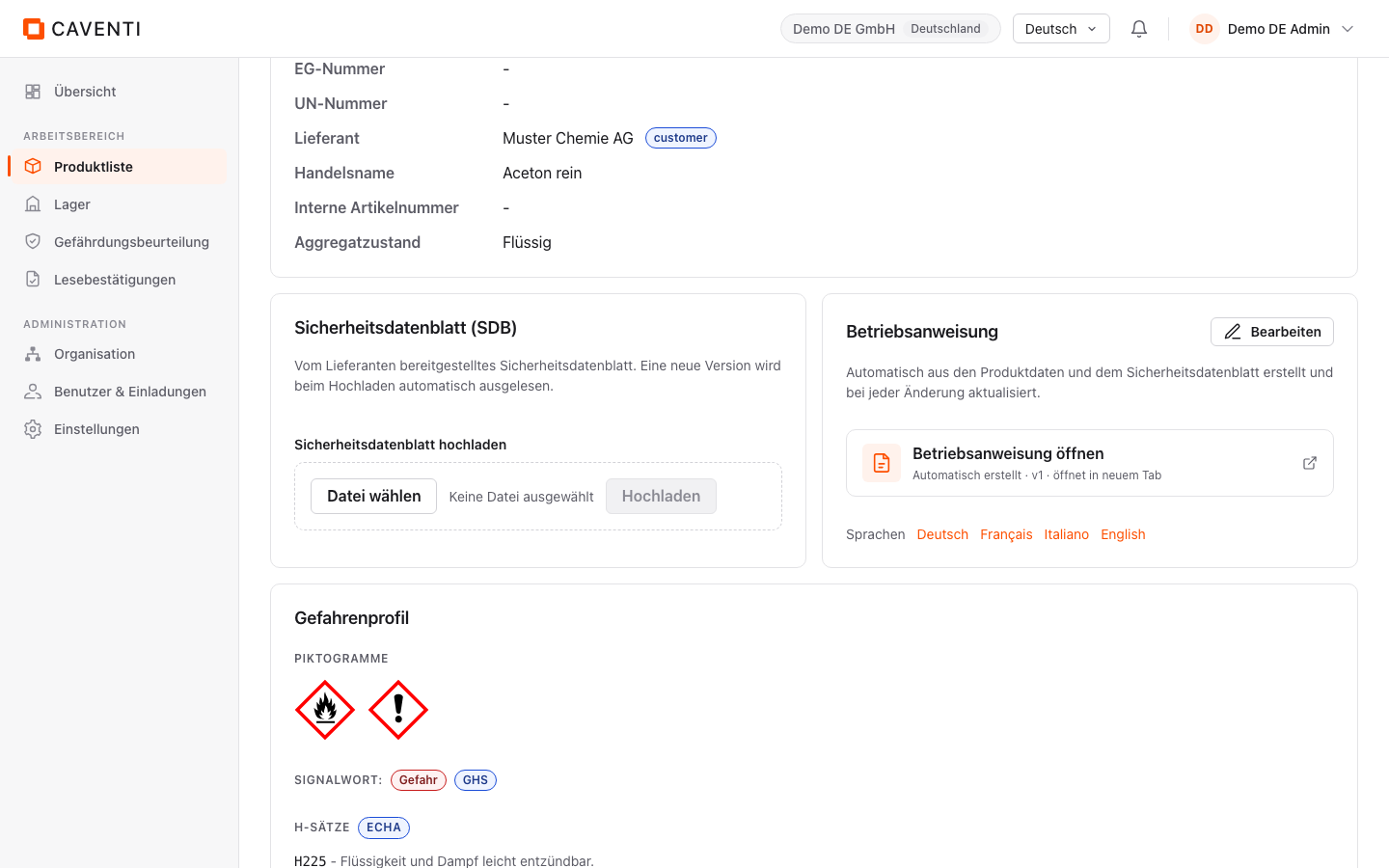
On the product detail page sits the "Betriebsanweisung" card. Its subtitle states the origin: "Automatisch aus den Produktdaten und dem Sicherheitsdatenblatt erstellt und bei jeder Änderung aktualisiert." The "Betriebsanweisung öffnen" link delivers the PDF in a new tab; the meta line "Automatisch erstellt · v1 · öffnet in neuem Tab" shows origin and version.
Under the "Sprachen" label sit four links: "Deutsch", "Français", "Italiano", "English". Each opens the same instruction in the chosen language. The links are always shown; a language version is generated on first open if it does not exist yet. The "Bearbeiten" button leads to the text editor.
Edit the texts per product
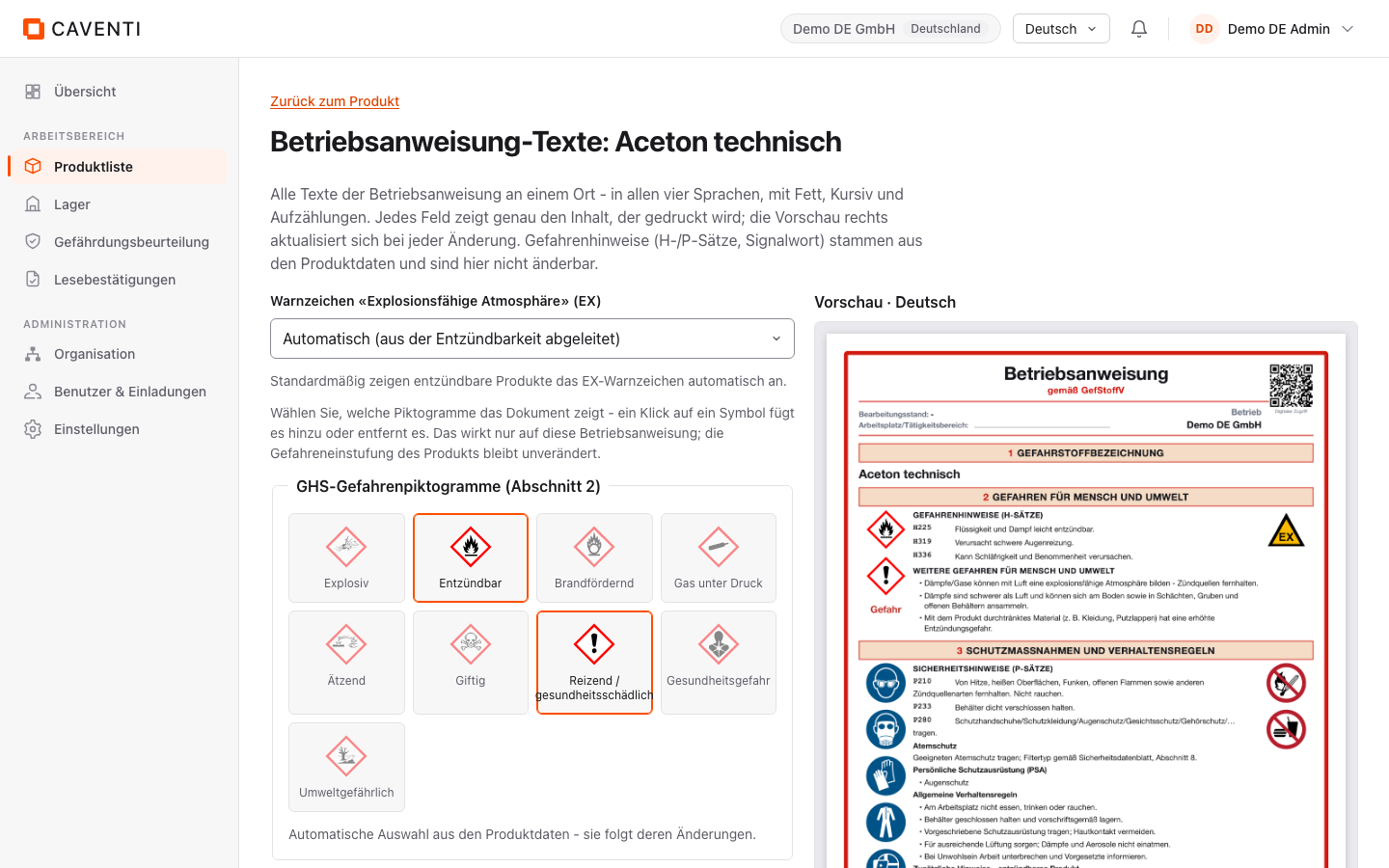
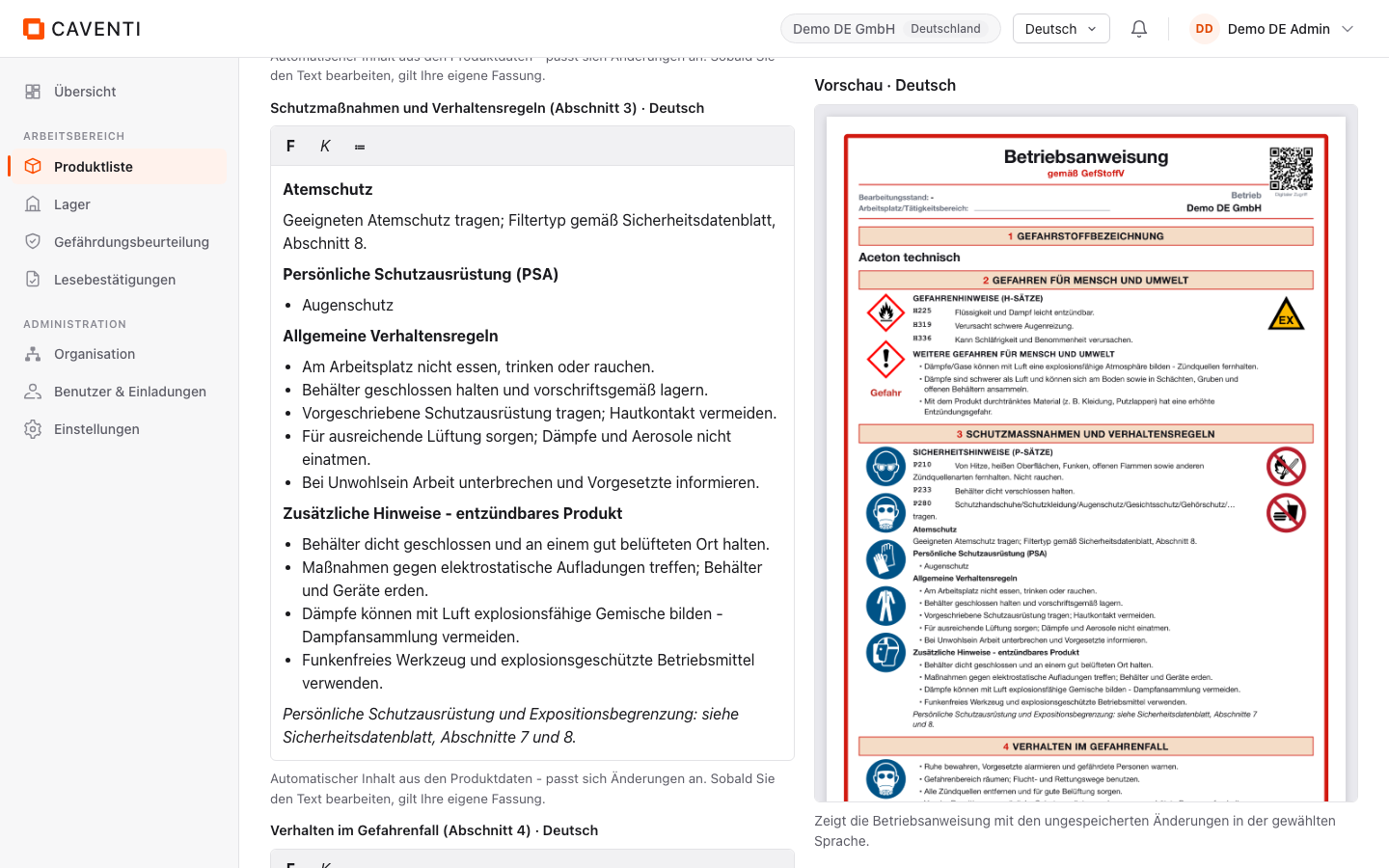
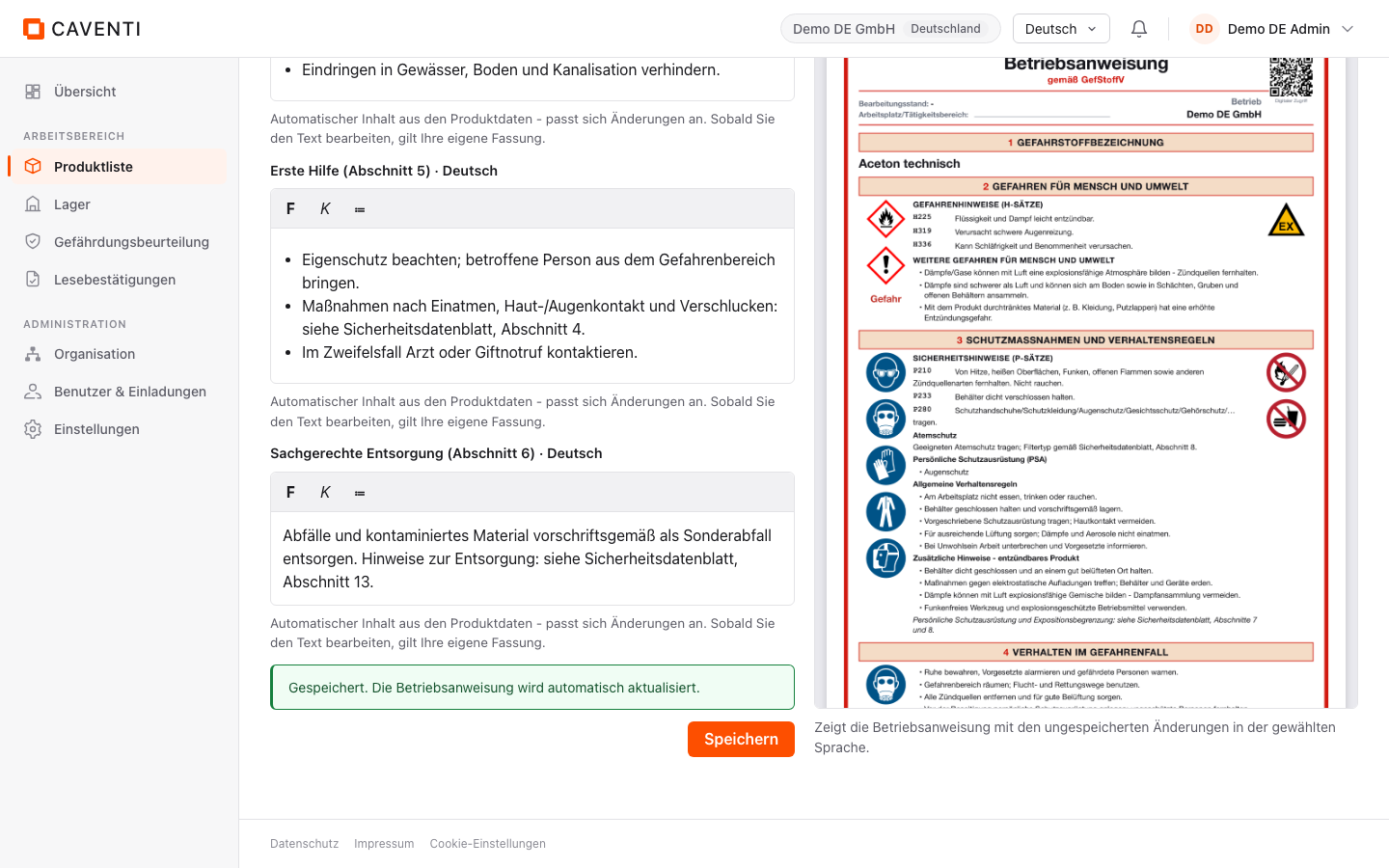
The editor under /products/:id/ba is headed "Betriebsanweisung-Texte: <product name>". The language tabs "Deutsch", "Français", "Italiano", "English" pick the language being edited. Each section has a rich-text field with bold, italic and list tools, for example "Schutzmassnahmen und Verhaltensregeln (Abschnitt 3)", "Verhalten im Gefahrenfall (Abschnitt 4)", "Erste Hilfe (Abschnitt 5)" and "Sachgerechte Entsorgung (Abschnitt 6)". A fixed preview "Vorschau · Deutsch" on the right shows every change immediately, exactly as it will print.
Each field starts in the automatic state with the note "Automatischer Inhalt aus den Produktdaten - passt sich Änderungen an. Sobald Sie den Text bearbeiten, gilt Ihre eigene Fassung." Once you edit a field it switches to the "Eigener Text" state and the "Auf automatischen Inhalt zurücksetzen" button appears for that block. The automatic content stays the default, and your edit is reversible at any time.
Not every text is editable here: hazard statements (H and P), the signal word and the pictograms come from the product data and are deliberately not editable in the editor. The operating instruction takes them over unchanged and in their official form:
SIGNALWORT: Gefahr
H225 - Flüssigkeit und Dampf leicht entzündbar.
H319 - Verursacht schwere Augenreizung.
H336 - Kann Schläfrigkeit und Benommenheit verursachen.
Taken from the product record; not editable in the editor and never machine-translated.
Override the pictograms and the EX warning sign
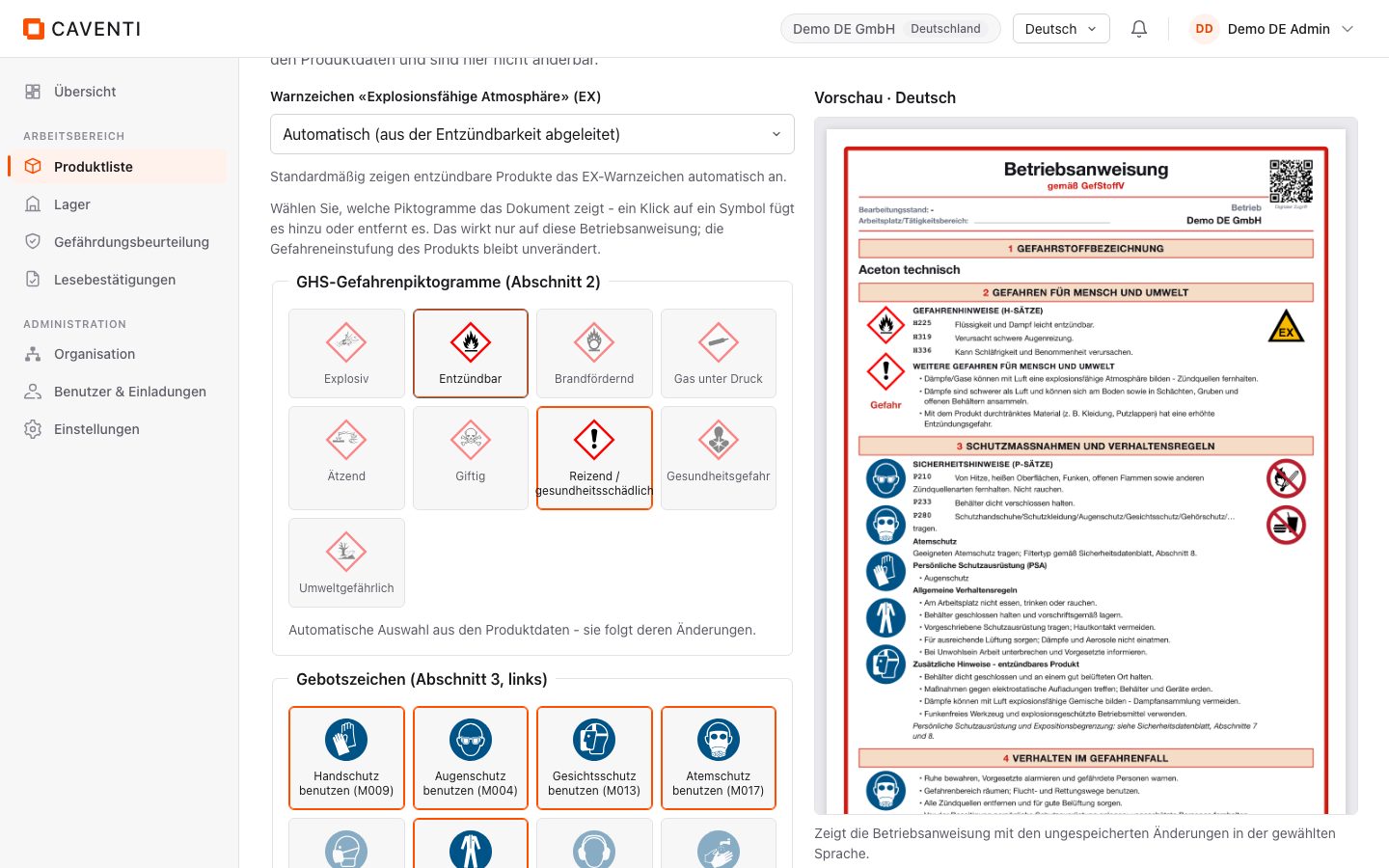
The editor offers a pictogram catalog in three groups: "GHS-Gefahrenpiktogramme (Abschnitt 2)", "Gebotszeichen (Abschnitt 3, links)" and "Verbotszeichen (Abschnitt 3, rechts)". Each group is a grid of toggle tiles. Automatically derived signs are pressed: for Aceton (H225/H319/H336) "Entzündbar" and "Reizend / gesundheitsschädlich" are active. Clicking a tile adds or removes a sign.
As long as nothing is changed, the note "Automatische Auswahl aus den Produktdaten - sie folgt deren Änderungen." shows and there is no reset button. After the first click the group switches to "Eigene Auswahl - wird wie gewählt gedruckt" and gains an "Auf automatische Auswahl zurücksetzen" button. Important: this selection affects only the operating instruction; the product hazard classification stays unchanged.
The "Explosive atmosphere" (EX) warning sign is driven by its own select. The default is "Automatisch (aus der Entzündbarkeit abgeleitet)"; the options "Immer anzeigen" and "Nicht anzeigen" force or suppress the EX sign. By default flammable products show the EX warning sign automatically.
Save and (optionally) translate
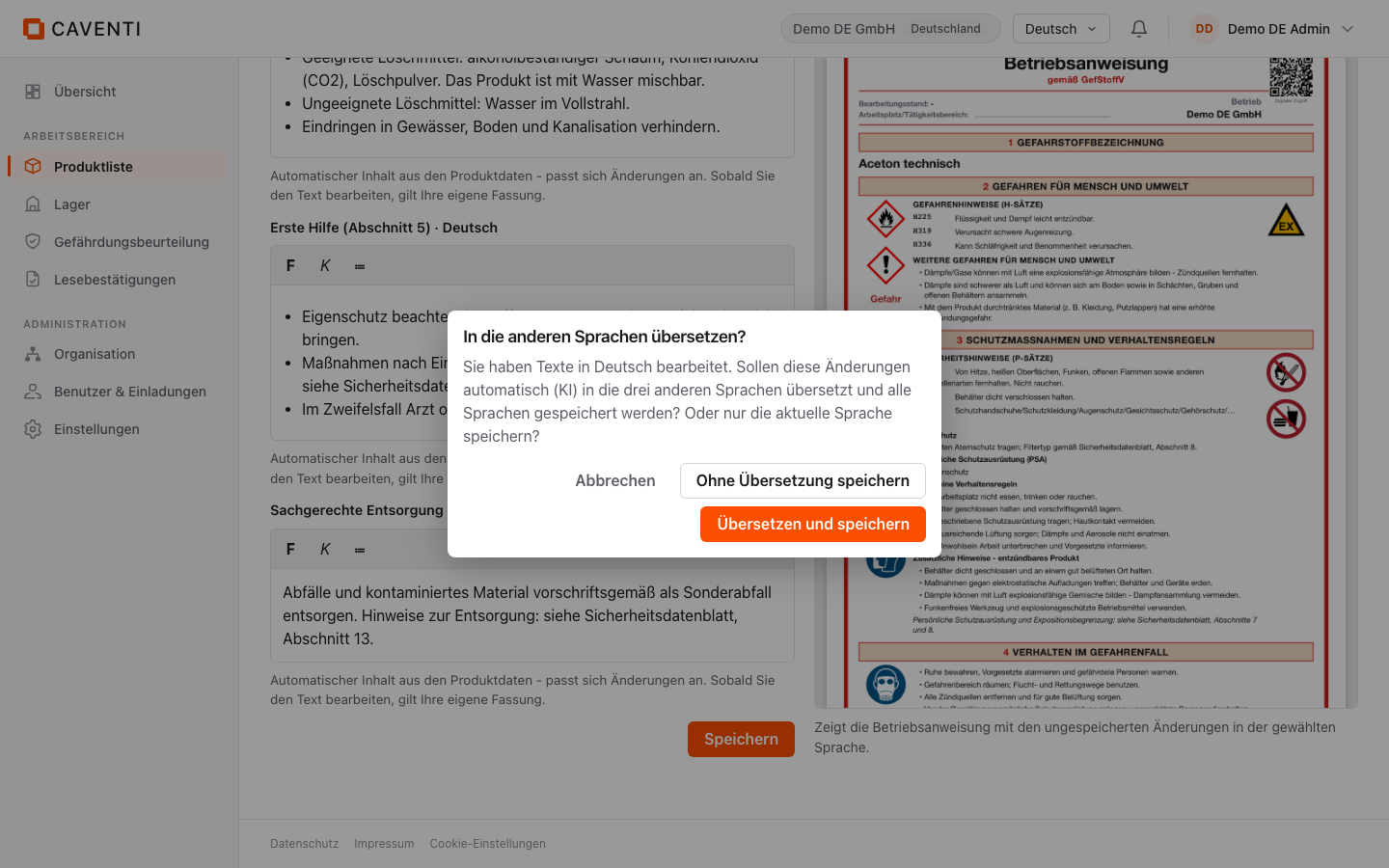
After editing, the "Speichern" button opens a dialog headed "In die anderen Sprachen übersetzen?". The text explains: "Sie haben Texte in Deutsch bearbeitet. Sollen diese Änderungen automatisch (KI) in die drei anderen Sprachen übersetzt und alle Sprachen gespeichert werden? Oder nur die aktuelle Sprache speichern?" You choose "Ohne Übersetzung speichern", "Übersetzen und speichern" or "Abbrechen".
"Ohne Übersetzung speichern" saves only the language you were editing. "Übersetzen und speichern" lets the AI carry your changes into the other three languages and saves all four. In both cases the confirmation "Gespeichert. Die Betriebsanweisung wird automatisch aktualisiert." follows. Machine translation touches only the free-form texts: hazard statements, signal word and GHS classification are never translated.
Shape it company-wide: the BA studio
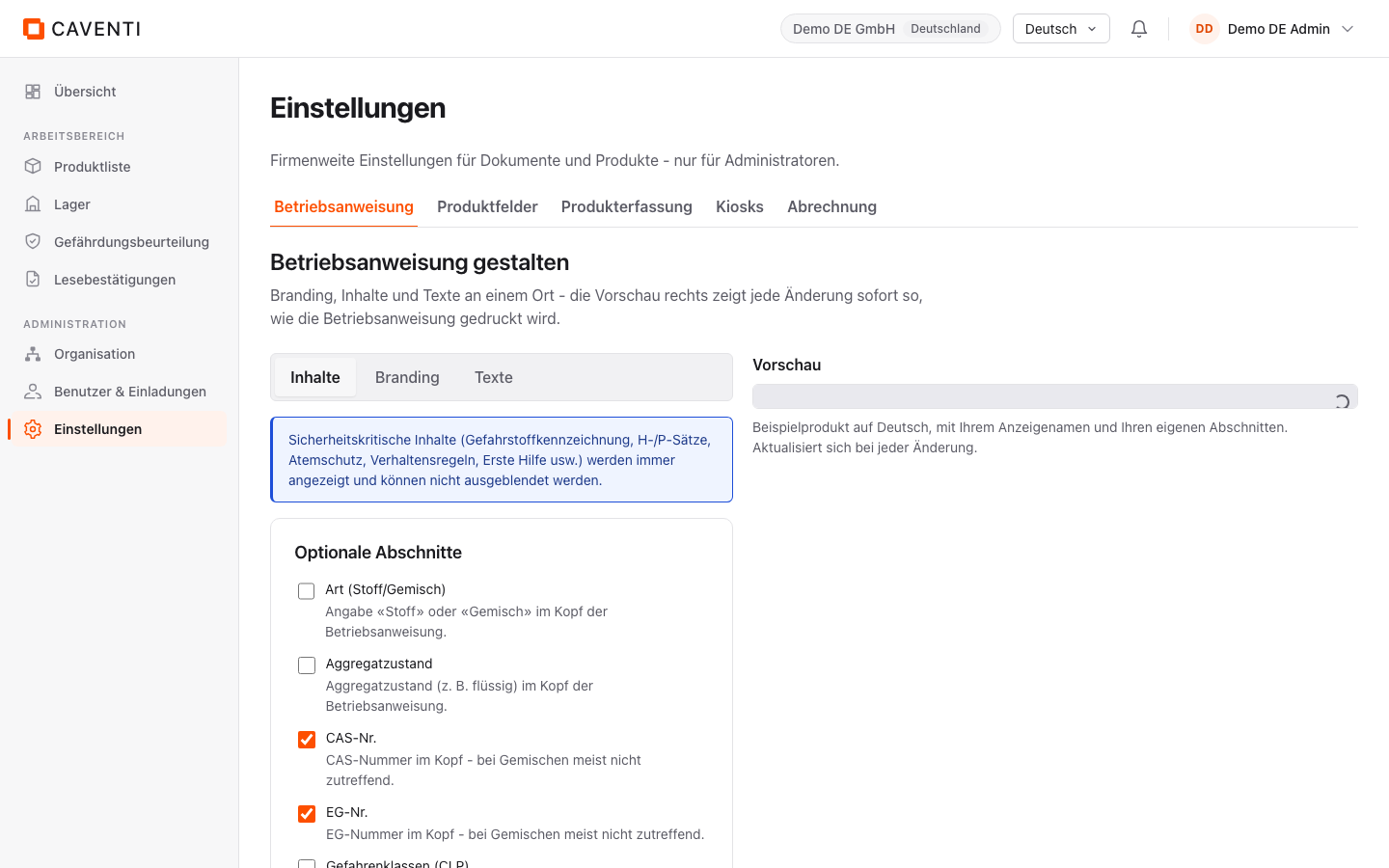
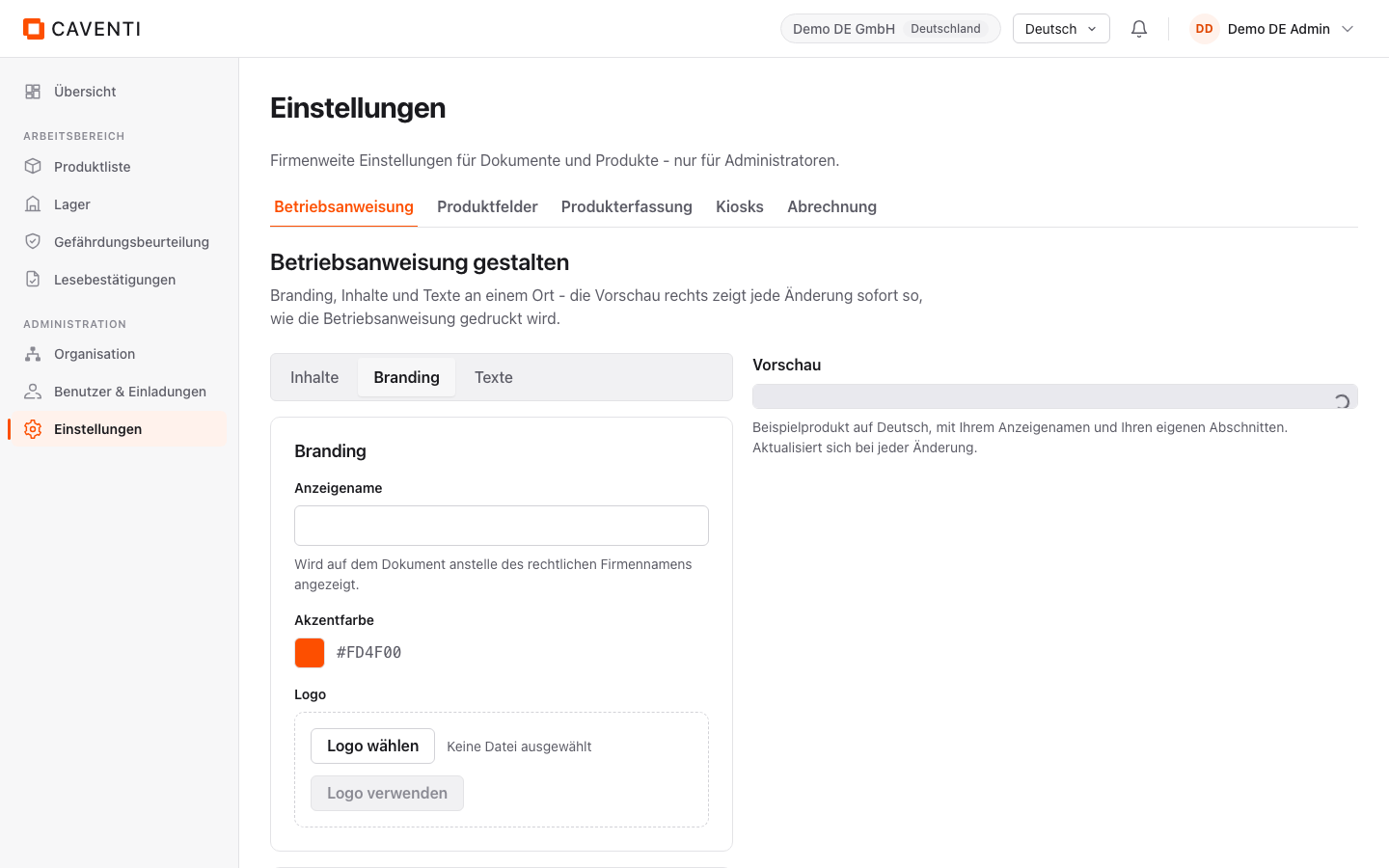
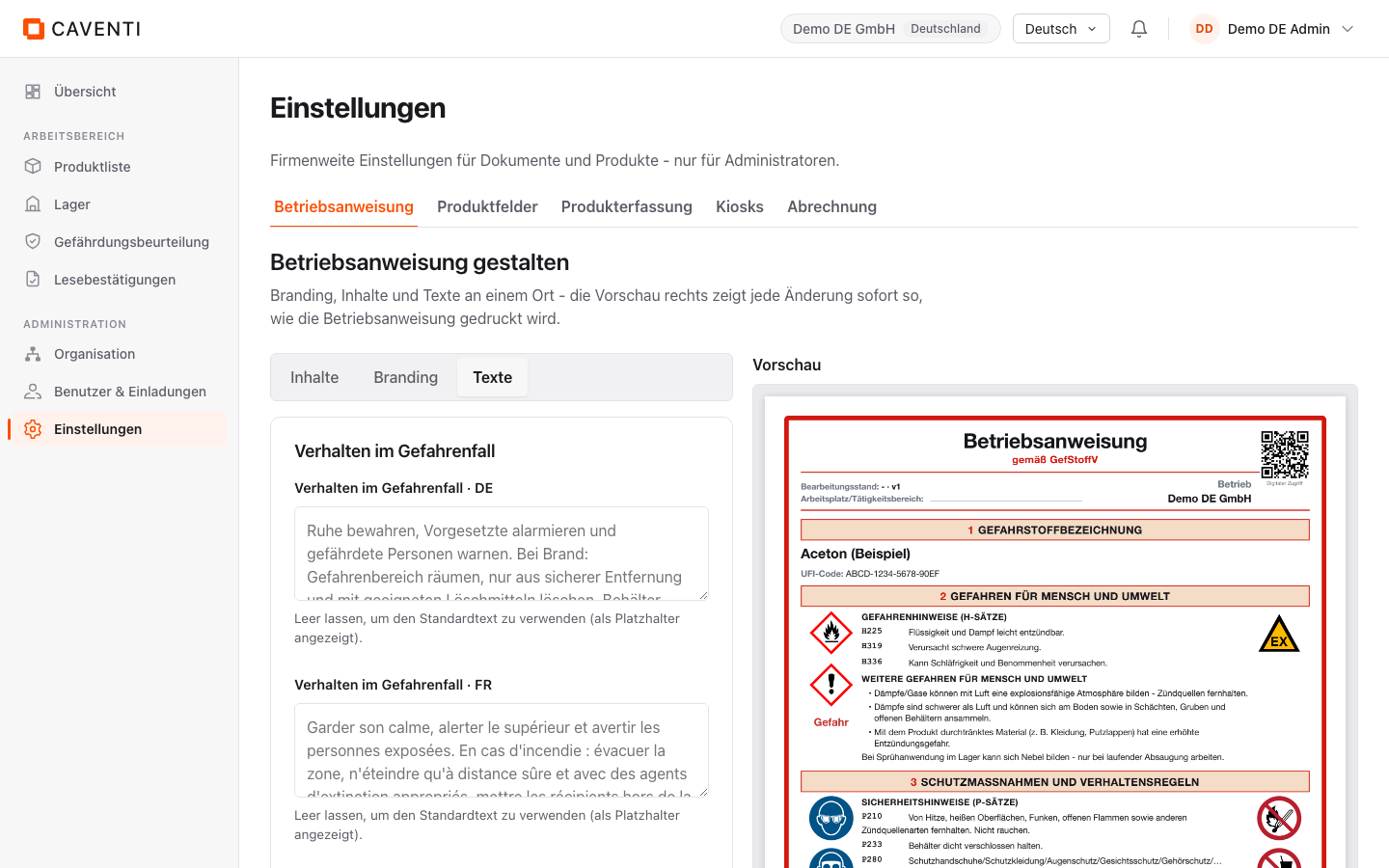
Under Settings, the "Betriebsanweisung" tab (/settings/ba) holds the BA studio, headed "Betriebsanweisung gestalten". The subtitle sums it up: "Branding, Inhalte und Texte an einem Ort - die Vorschau rechts zeigt jede Änderung sofort so, wie die Betriebsanweisung gedruckt wird." Three inner tabs structure the studio: "Inhalte", "Branding", "Texte". All changes apply to every operating instruction in the company.
"Inhalte" turns optional sections on or off. A blue safety notice sets the boundary: "Sicherheitskritische Inhalte (Gefahrstoffkennzeichnung, H-/P-Sätze, Atemschutz, Verhaltensregeln, Erste Hilfe usw.) werden immer angezeigt und können nicht ausgeblendet werden." Optional items include Art (Stoff/Gemisch), Aggregatzustand, CAS-Nr., EG-Nr., Gefahrenklassen (CLP), the physico-chemical data, Transport (ADR) and "QR-Code (Etikette)". The QR-Code (Etikette) is switched on by default.
"Branding" sets the appearance: the "Anzeigename" field ("Wird auf dem Dokument anstelle des rechtlichen Firmennamens angezeigt."), the "Akzentfarbe" (default #FD4F00) and a logo via "Logo wählen". "Texte" maintains company-wide standard texts per language, for example "Verhalten im Gefahrenfall · DE" and the matching FR/IT/EN fields; the note "Leer lassen, um den Standardtext zu verwenden (als Platzhalter angezeigt)." explains the fallback. The preview on the right (sample product "Aceton (Beispiel)") updates on every change.
The automatic hazard narrative (section 2)
Section 2 of the instruction holds not only the verbatim H statements but also an explanatory hazard narrative under "Weitere Gefahren für Mensch und Umwelt". It is drafted automatically in all four languages when the product is created, from the product data and the safety data sheet, and is marked "Automatischer Inhalt" in the editor. For a flammable product such as Aceton it reads, for example: "Dämpfe können mit Luft explosionsfähige Gemische bilden - Dampfansammlung vermeiden."
This narrative is an explanation, not a replacement for the official hazard statements: the H and P statements and the signal word beside it stay unchanged and untranslated. To refine the explanatory text, edit it in the editor; the field then switches to "Eigener Text" and can be reset to the automatic draft at any time. Where the underlying values come from is visible on the product detail page with provenance.
FAQ
When is the operating instruction generated?
Automatically as soon as the product exists, and again on every product change. A language version is generated at the latest when its link is first opened; the four language links are always visible.
Are my text edits translated?
Only if you choose "Übersetzen und speichern" when saving; the AI then carries the free-form texts into the other three languages. Hazard statements (H and P), the signal word and the GHS classification are never machine-translated and stay in their official form.
Can I hide mandatory content such as H statements or first aid?
No. Safety-critical content (hazardous-substance labelling, H and P statements, respiratory protection, rules of conduct, first aid and more) is always shown. In the BA studio only additional sections such as CAS-Nr., ADR or the label QR code can be switched on and off.
Continue in the documentation
Try Caventi for free
Add your first product and see the derived hazards, the joint-storage check and the operating instruction in minutes.